
 文档环境搭建
# 关于Markdown
Markdown 是一种轻量级标记语言,它允许人们使用易读易写的纯文本格式编写文档。 Markdown 能被使用来撰写电子书,如:Gitbook。 当前许多网站都广泛使用 Markdown 来撰写帮助文档或是用于论坛上发表消息。例如:GitHub、简书、reddit、Diaspora、Stack Exchange、OpenStreetMap 、SourceForge等。
# 选型VuePress
GitBook,Nuxt,Hexo,Docsify,vuepress等较新的文档方案都使用Markdown作为核心编写语言。
VuePress专注于文档,它简洁至上,能最大限度降低文档编写的工作量。
同时它以代码的方式维护文档,通过扩展实现任何代码能实现的功能。
非常适合程序员编写文档。
Nuxt
VuePress 能做的事情,Nuxt 理论上确实能够胜任,但 Nuxt 是为构建应用程序而生的,而 VuePress 则专注在以内容为中心的静态网站上,同时提供了一些为技术文档定制的开箱即用的特性。
# 为什么不是(来自VuePress官网)
Docsify / Docute
这两个项目同样都是基于 Vue,然而它们都是完全的运行时驱动,因此对 SEO 不够友好。如果你并不关注 SEO,同时也不想安装大量依赖,它们仍然是非常好的选择!Hexo
Hexo 一直驱动着 Vue 的文档 —— 事实上,在把我们的主站从 Hexo 迁移到 VuePress 之前,我们可能还有很长的路要走。Hexo 最大的问题在于他的主题系统太过于静态以及过度地依赖纯字符串,而我们十分希望能够好好地利用 Vue 来处理我们的布局和交互,同时,Hexo 的 Markdown 渲染的配置也不是最灵活的。GitBook
我们的子项目文档一直都在使用 GitBook。GitBook 最大的问题在于当文件很多时,每次编辑后的重新加载时间长得令人无法忍受。它的默认主题导航结构也比较有限制性,并且,主题系统也不是 Vue 驱动的。GitBook 背后的团队如今也更专注于将其打造为一个商业产品而不是开源工具。
# 使用vdoning主题
https://xugaoyi.github.io/vuepress-theme-vdoing-doc/ (opens new window)
# 前端环境搭建
VuePpress是基于vue的一个前端项目,所以需要先参考前端项目,安装好vscode,nodejs等软件
- 前端环境搭建
- 安装PicGo插件
# 文档项目
- 从svn下载文档项目
tortoisesvn (opens new window)(可选)
项目svn地址由具体项目提供 - 在文档项目根目录执行(只需执行一次)
npm install
- 启动
npm run dev
- 打开浏览器,输入项目url
# 编写markdown文档
vscode支持markdown文档,编写时调出即可

# 图片保存在本地
- 安装Paste Image插件
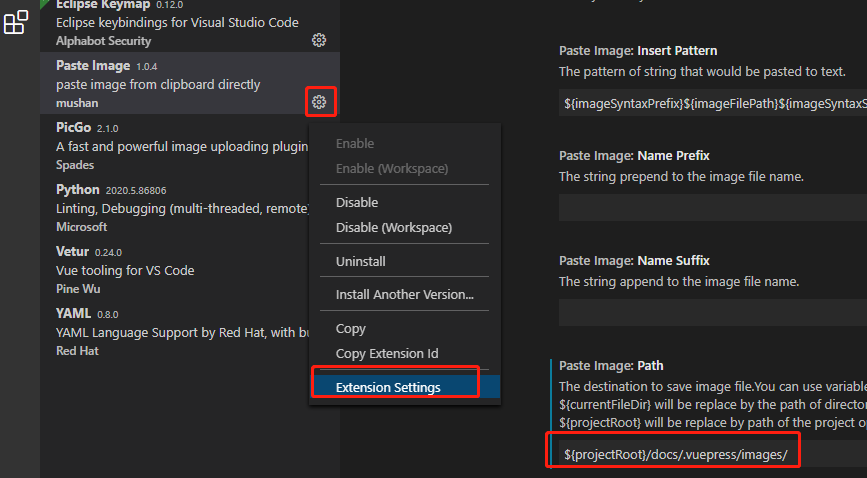
${projectRoot}/docs/.vuepress/images/
用qq,微信等软件截图,ctrl+alt+v可插入图片
# 图片上传到图床
- 安装picgo插件,配置aliyun图库
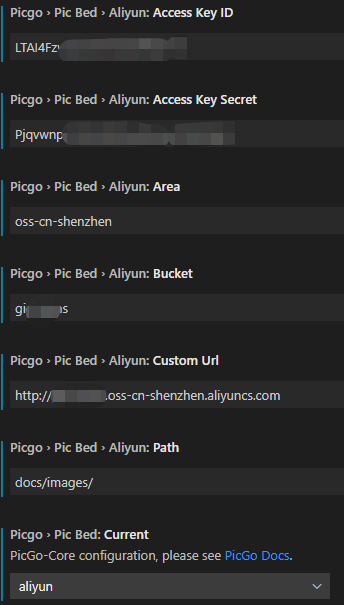
- 用qq,微信等软件截图,ctrl+alt+u 调出picgo上传插入图片功能
# 分类页,内容自动生成
- 新建分类页面的md,位置不要求 key 是对应需要分类页面的目录
---
pageComponent: # 使用页面组件
  name: Catalogue # 组件名:Catalogue => 目录页组件
  data: # 组件所需数据
    key:  01.前端 # 设置为指定文件夹的名称 (有序号的要带序号)
    imgUrl: /img/web.png # 目录页内的图片
    description: JavaScript、ES6、Vue框架等前端技术 # 目录描述(可加入a标签)

title: 前端 # 页面标题
date: 2020-01-12 11:51:53 # 创建日期
permalink: /note/javascript # 永久链接
sidebar: false # 是否显示侧边栏
article: false # 是否显示最近更新栏
comment: false # 是否显示评论栏
editLink: false # 是否显示编辑按钮
---
2
3
4
5
6
7
8
9
10
11
12
13
14
15
16
# VuePpress项目环境
# 目录结构
.
├── docs
│   │  (不参与生成)
│   ├── .vuepress
│   ├── @pages
│   ├── _posts
│   ├── index.md
│   │
│   │ (以下部分将会参与生成)
│   ├── 《JavaScript教程》专栏
│   │   ├── 01.章节1
│   │   |   ├── 01.js1.md
│   │   |   ├── 02.js2.md
│   │   |   └── 03.js3.md
│   │   └── 02.章节2
│   │   |   ├── 01.jsa.md
│   │   |   └── 02.jsb.md
│   ├── 01.前端
│   │   ├── 01.JavaScript
│   │   |   ├── 01.js1.md
│   │   |   ├── 02.js2.md
│   │   |   └── 03.js3.md
│   │   └── 02.vue
│   │   |   ├── 01.vue1.md
│   │   |   └── 02.vue2.md
│   ├── 02.其他
│   │   ├── 01.学习
│   │   |   ├── 01.xxa.md
│   │   |   └── 02.xxb.md
│   │   ├── 02.学习笔记
│   │   |   ├── 01.xxa.md
│   │   |   └── 02.xxb.md
│   │   ├── 03.文件x.md
│   │   └── 04.文件xx.md
│   └── 03.关于我
│   │   └── 01.关于我.md
.   .
2
3
4
5
6
7
8
9
10
11
12
13
14
15
16
17
18
19
20
21
22
23
24
25
26
27
28
29
30
31
32
33
34
35
36
37
# pacage.json文件
{
  "name": "theme-vdoing-doc",
  "version": "1.0.0",
  "scripts": {
    "dev": "vuepress dev docs",
    "build": "vuepress build docs",
    "deploy": "bash deploy.sh",
    "editFm": "node utils/editFrontmatter.js"
  },
  "license": "MIT",
  "devDependencies": {
    "inquirer": "^7.1.0",
    "json2yaml": "^1.1.0",
    "dayjs": "^1.8.28",
    "vuepress": "^1.4.1",
    "vuepress-plugin-demo-block": "^0.7.2",
    "vuepress-plugin-one-click-copy": "^1.0.2",
    "vuepress-plugin-thirdparty-search": "^1.0.2",
    "vuepress-plugin-zooming": "^1.1.7",
    "vuepress-theme-vdoing": "^1.2.2",
    "yamljs": "^0.3.0"
  }
}
2
3
4
5
6
7
8
9
10
11
12
13
14
15
16
17
18
19
20
21
22
23
# .vuepress/config.js
const nav = require('./config/nav.js');
module.exports = {
title: "xxx系统文档",
description: 'xxx系统相关文档',
port: 8086,
base: '/', // '/<github仓库名>/', 默认'/'
head: [ // 注入到页面<head> 中的标签,格式[tagName, { attrName: attrValue }, innerHTML?]
['link', { rel: 'icon', href: '/favicon.ico' }], //favicons,资源放在public文件夹
//['meta', { name: 'keywords', content: ''}],
['meta', { name: 'theme-color', content: '#11a8cd'}], // 移动浏览器主题颜色
// 以下是vuepress-plugin-demo-block插件所需依赖
// ['script', { src: 'https://cdn.jsdelivr.net/npm/vue/dist/vue.min.js' }], // 此文件会影响导航router-link-active样式的切换,改为在enhanceApp.js中把Vue构造函数绑定到window上
// ['script', { src: 'https://cdn.jsdelivr.net/npm/@babel/standalone/babel.min.js' }],
],
markdown: {
lineNumbers: true // 代码行号
},
theme: 'vdoing', // 使用依赖包主题
// theme: require.resolve('../../vuepress-theme-vdoing'), // 使用本地主题
themeConfig: { // 主题配置
nav,
sidebarDepth: 2, // 侧边栏显示深度,默认1,最大2(显示到h3标题)
logo: 'http://test121.gpgdd.com/static/img/avatar.8997275.png', // 导航栏logo
//repo: 'xugaoyi/vuepress-theme-vdoing', // 导航栏右侧生成Github链接
searchMaxSuggestions: 10, // 搜索结果显示最大数
lastUpdated: '上次更新', // 更新的时间,及前缀文字 string | boolean (取值为git提交时间)
docsDir: 'docs', // 编辑的文件夹
editLinks: false, // 编辑链接
editLinkText: '编辑',
// 以下配置是Vdoing主题改动的和新增的配置
sidebar: { mode: 'structuring', collapsable: false }, // 侧边栏 'structuring' | { mode: 'structuring', collapsable: Boolean} | 'auto' | 自定义 温馨提示:目录页数据依赖于结构化的侧边栏数据,如果你不设置为'structuring',将无法使用目录页
// sidebarOpen: false, // 初始状态是否打开侧边栏,默认true
updateBar: { // 最近更新栏
showToArticle: false, // 显示到文章页底部,默认true
// moreArticle: '/archives' // “更多文章”跳转的页面,默认'/archives'
},
// titleBadge: false, // 文章标题前的图标是否显示,默认true
// titleBadgeIcons: [ // 文章标题前图标的地址,默认主题内置图标
// '图标地址1',
// '图标地址2'
// ],
// bodyBgImg: [
// 'https://cdn.jsdelivr.net/gh/xugaoyi/image_store/blog/20200507175828.jpeg',
// 'https://cdn.jsdelivr.net/gh/xugaoyi/image_store/blog/20200507175845.jpeg',
// 'https://cdn.jsdelivr.net/gh/xugaoyi/image_store/blog/20200507175846.jpeg'
// ], // body背景大图,默认无。 单张图片 String || 多张图片 Array, 多张图片时每隔15秒换一张。
// categoryText: '随笔', // 碎片化文章(_posts文件夹的文章)预设生成的分类值,默认'随笔'
category: false, // 是否打开分类功能,默认true。 如打开,会做的事情有:1. 自动生成的frontmatter包含分类字段 2.页面中显示与分类相关的信息和模块 3.自动生成分类页面(在@pages文件夹)。如关闭,则反之。
tag: false, // 是否打开标签功能,默认true。 如打开,会做的事情有:1. 自动生成的frontmatter包含标签字段 2.页面中显示与标签相关的信息和模块 3.自动生成标签页面(在@pages文件夹)。如关闭,则反之。
// archive: false, // 是否打开归档功能,默认true。 如打开,会做的事情有:1.自动生成归档页面(在@pages文件夹)。如关闭,则反之。
author: { // 文章默认的作者信息,可在md文件中单独配置此信息 String | {name: String, href: String}
name: 'GICT', // 必需
href: 'http://www.gictgict.com/sy' // 可选的
},
/* social:{ // 社交图标,显示于博主信息栏和页脚栏
// iconfontCssFile: '//at.alicdn.com/t/font_1678482_u4nrnp8xp6g.css', // 可选,阿里图标库在线css文件地址,对于主题没有的图标可自由添加
icons: [
{
iconClass: 'icon-youjian',
title: '发邮件',
link: 'mailto:894072666@qq.com'
},
{
iconClass: 'icon-github',
title: 'GitHub',
link: 'https://github.com/xugaoyi'
},
{
iconClass: 'icon-erji',
title: '听音乐',
link: 'https://music.163.com/#/playlist?id=755597173'
}
]
}, */
/* footer:{ // 页脚信息
createYear: 2020, // 博客创建年份
copyrightInfo: '净食安净菜管理系统', // 博客版权信息,支持a标签
} */
},
plugins: [ // 插件
// [require('./plugins/love-me'), { // 鼠标点击爱心特效
// color: '#11a8cd', // 爱心颜色,默认随机色
// excludeClassName: 'theme-vdoing-content' // 要排除元素的class, 默认空''
// }],
['thirdparty-search', { // 可以添加第三方搜索链接的搜索框(原官方搜索框的参数仍可用)
thirdparty: [ // 可选,默认 []
/* {
title: '在GitHub中搜索',
frontUrl: 'https://github.com/search?q=', // 搜索链接的前面部分
behindUrl: '' // 搜索链接的后面部分,可选,默认 ''
},
{
title: '在npm中搜索',
frontUrl: 'https://www.npmjs.com/search?q=',
},
{
title: '在Bing中搜索',
frontUrl: 'https://cn.bing.com/search?q='
} */
{
title: '在百度中搜索',
frontUrl: 'https://www.baidu.com/s?ie=utf8&oe=utf8&wd='
}
]
}],
[
/*
package.json加上"devDependencies vuepress-plugin-baidu-tongji": "^1.0.1",
'vuepress-plugin-baidu-tongji', // 百度统计
{
hm: '01293bffa6c3962016c08ba685c79d78'
} */
],
['one-click-copy', { // 代码块复制按钮
copySelector: ['div[class*="language-"] pre', 'div[class*="aside-code"] aside'], // String or Array
copyMessage: '复制成功', // default is 'Copy successfully and then paste it for use.'
duration: 1000, // prompt message display time.
showInMobile: false // whether to display on the mobile side, default: false.
}],
/* ['demo-block', { // demo演示模块 https://github.com/xiguaxigua/vuepress-plugin-demo-block
settings: {
// jsLib: ['http://xxx'], // 在线示例(jsfiddle, codepen)中的js依赖
// cssLib: ['http://xxx'], // 在线示例中的css依赖
// vue: 'https://cdn.jsdelivr.net/npm/vue/dist/vue.min.js', // 在线示例中的vue依赖
jsfiddle: false, // 是否显示 jsfiddle 链接
codepen: true, // 是否显示 codepen 链接
horizontal: false // 是否展示为横向样式
}
}], */
[
'vuepress-plugin-zooming', // 放大图片
{
selector:'.theme-vdoing-content img:not(.no-zoom)',
options: {
bgColor: 'rgba(0,0,0,0.6)'
},
},
],
[
'@vuepress/last-updated', // "上次更新"时间格式
{
transformer: (timestamp, lang) => {
const moment = require('dayjs') // https://momentjs.com/
return moment(timestamp).format('YYYY-MM-DD HH:mm:ss');
}
}
]
],
// configureWebpack: {
// //webpack别名 如
// resolve: {
// alias: {
// '@alias': 'path/to/some/dir'
// }
// }
// }
}
2
3
4
5
6
7
8
9
10
11
12
13
14
15
16
17
18
19
20
21
22
23
24
25
26
27
28
29
30
31
32
33
34
35
36
37
38
39
40
41
42
43
44
45
46
47
48
49
50
51
52
53
54
55
56
57
58
59
60
61
62
63
64
65
66
67
68
69
70
71
72
73
74
75
76
77
78
79
80
81
82
83
84
85
86
87
88
89
90
91
92
93
94
95
96
97
98
99
100
101
102
103
104
105
106
107
108
109
110
111
112
113
114
115
116
117
118
119
120
121
122
123
124
125
126
127
128
129
130
131
132
133
134
135
136
137
138
139
140
141
142
143
144
145
146
147
148
149
150
151
152
153
154
155
156
157
158
159
160
161
162
163
164
165
166
167
168
169
170
171