
 前端环境搭建
# Nodejs下载安装
# vue-cli 安装
npm install -g @vue/cli
1
# IDE vscode
# 下载安装
# 安装扩展插件
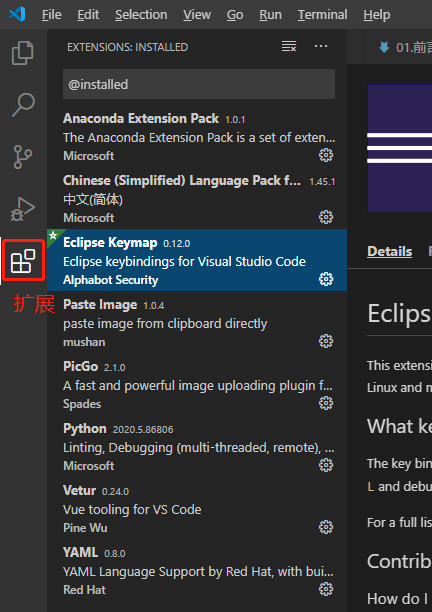
所选扩展: Vetur vue语法支持
可选扩展:chinese 语言包,eclipse快捷键
# 配置 edit in settings.json
- "vetur.format.options.tabSize": 4
- 改大js-beautify-html -> wrap-line-length,format时不自动换行
"vetur.format.defaultFormatter.html": "js-beautify-html",
    "vetur.format.defaultFormatter.js": "vscode-typescript",
    "vetur.format.defaultFormatterOptions": {
        "js-beautify-html": {
            "wrap_attributes": "auto",
            "wrap_attributes_mode": "auto",
            "wrap-line-length": 500,
            "wrapped_attributes_per_line": "multiple",
            "wrapped_attributes_indent": "auto",
            "wrapped_attributes_end": "auto",
            "end_with_newline": true
        }
    }
1
2
3
4
5
6
7
8
9
10
11
12
13
2
3
4
5
6
7
8
9
10
11
12
13
# 项目相关
# 项目svn地址
由具体项目提供
# npm私库设置
- 指定@mt开头组件的仓库地址(只需设一次)
npm config set @mt:registry http://nexus660.gpgdd.com:9300/repository/npm_hosted/

//如果设置失败,就去用户目录下找.npmrc
//npm config ls就有.npmrc位置
@mt:registry=http://nexus660.gpgdd.com:9300/repository/npm_hosted/
//nexus660.gpgdd.com:9300/repository/npm_hosted/:_authToken=省略
1
2
3
4
5
6
7
2
3
4
5
6
7
- 私库登录(只需设一次),用户名和密码由项目提供
npm adduser --registry=http://nexus660.gpgdd.com:9300/repository/npm_hosted/ --always-auth
1